Software Licensing with Stripe: How the Checkout-to-License Flow Actually Works
A real walkthrough of how PermitCore turns a Stripe checkout into a working license key automatically — the webhook flow, your own Stripe account, and 0% commission.
Stripe Checkout to Automatic Software License Delivery | PermitCore Tutorial
Follow a Stripe test checkout through webhook fulfillment to automatic license delivery in My Keys.
Open on YouTubeCurrent Store choices are Stripe and Paddle. Choose one provider for your entire Store.
Most teams that sell a licensed software product end up gluing two systems together by hand: whatever handles payment, and whatever handles license keys. The usual result is a webhook handler written under deadline pressure, a few silent edge cases, and a support inbox full of "I paid but never got my key" emails.
This post walks through the Store's Stripe path, from the moment a signed-in customer clicks "Buy" to the moment their paid license appears in My Keys and an email links them back to their account.
It's Your Stripe Account, Not PermitCore's
This walkthrough uses the Stripe option. Each vendor can instead select Paddle for the whole Store. Their account, catalog, tax and invoice setup differs; the provider setup guide covers those paths. Changing the selection affects new checkouts while existing subscriptions keep their original connection.
The Store connects to your own Stripe account — you provide your Stripe secret key in the Admin panel, and payouts settle directly to you. PermitCore takes 0% platform commission on Store sales. Stripe's processing fees and any selected Tax or Managed Payments fees follow your Stripe account's pricing.
That matters for how the rest of this works: PermitCore only finds out a sale happened when Stripe tells it — via a webhook — not by holding the funds itself.
The Flow, Step by Step
- A customer visits your storefront (
/store/{your-slug}), picks a product, and clicks Buy. - PermitCore creates a Stripe Checkout Session and a matching
Orderrow in Pending status, then redirects the customer to Stripe's own hosted checkout page. - The customer pays. Stripe fires a
checkout.session.completedwebhook to PermitCore'sStoreWebhookController, signed with your webhook secret. - The controller verifies the signature, finds the matching Pending order, generates a real license key for it, encrypts it, and marks the order Completed — all in one database transaction.
- A confirmation email linking the signed-in buyer to My Keys is queued. Legacy or external guest purchases without a registered account retain their separate key-delivery email path.
The customer never has to refresh a page or wait for polling — Stripe's webhook is the trigger, and the whole thing typically completes in under a second after payment confirms.
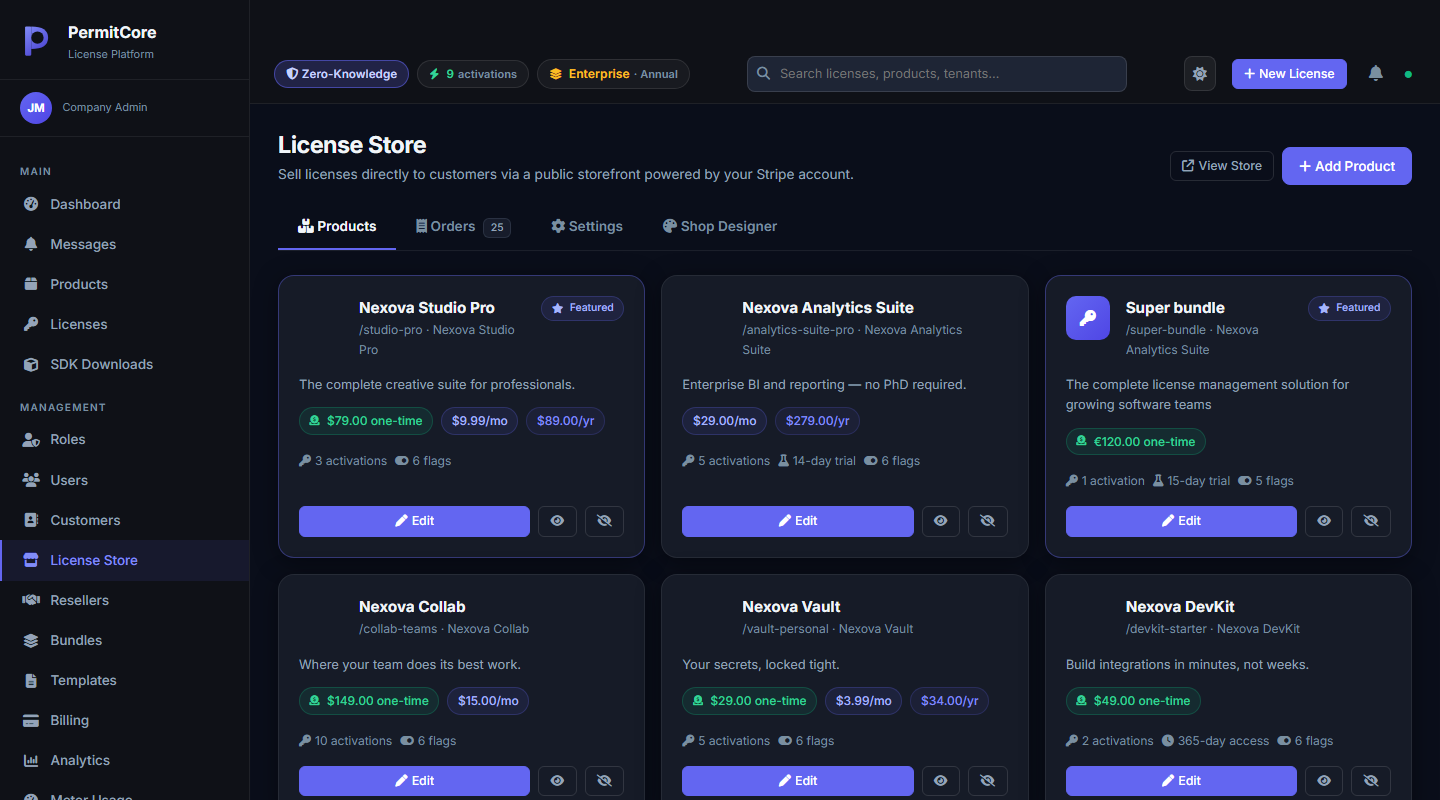
The Store admin panel — connect your Stripe secret key once, and every product listed here becomes purchasable through a hosted checkout page.
A Simplified Look at the Webhook Handler
The real handler deals with cart checkouts, invoices, and email retries — more than makes sense to reproduce here. The core shape looks like this:
// StoreWebhookController.cs (simplified)
switch (stripeEvent.Type)
{
    case "checkout.session.completed":
        await HandleCheckoutCompleted(stripeEvent);
        break;
    case "charge.refunded":
        await HandleRefund(stripeEvent);
        break;
    // ...payment_intent.payment_failed, checkout.session.expired, etc.
}
Inside HandleCheckoutCompleted, the order lookup, license generation, and status update all happen inside one SaveChangesAsync() — so a crash mid-request can't leave a customer with a "completed" order and no actual license, or a license with no record of the order that paid for it.
What About Subscriptions?
Store tax is a vendor choice: Vendor rates, Stripe Tax, or Managed Payments for eligible Stripe accounts and products. Stripe Tax uses the buyer's billing details, the product tax code and the vendor's active registrations; inclusive or exclusive pricing is configured per product. Signed payment events record Stripe's tax figures, and invoice history keeps each renewal document. Checkout stops clearly if the selected provider tax setup is unavailable. See Store tax configuration.
The Store supports recurring Stripe prices and extends the same license to the paid-through date on each paid subscription invoice. Failed renewals enter a configurable payment grace window, 14 days by default; paymentStatus and isInGracePeriod let your app show a card-update notice. Access expires when that window ends, and an ended subscription revokes the key. See subscription renewal controls. PermitCore's separate metered billing system can charge per usage event through the same Stripe connection.
What This Means for You
You keep full ownership of your payment relationship — your Stripe account, your payout schedule, your dispute handling. PermitCore's job is just to turn "this Stripe event happened" into "this customer now has a working, encrypted license key" reliably, without you writing that glue code yourself.
If you want the admin-side setup steps rather than the architecture, see Setting Up a License Store.
Build your first licensed product without building a license server.
Create a free PermitCore account, issue a test license, and validate it from your application.