Node-Locked vs. Floating Licenses: Which One Do You Need?
A practical, example-driven comparison of the two license models, and how to configure each.
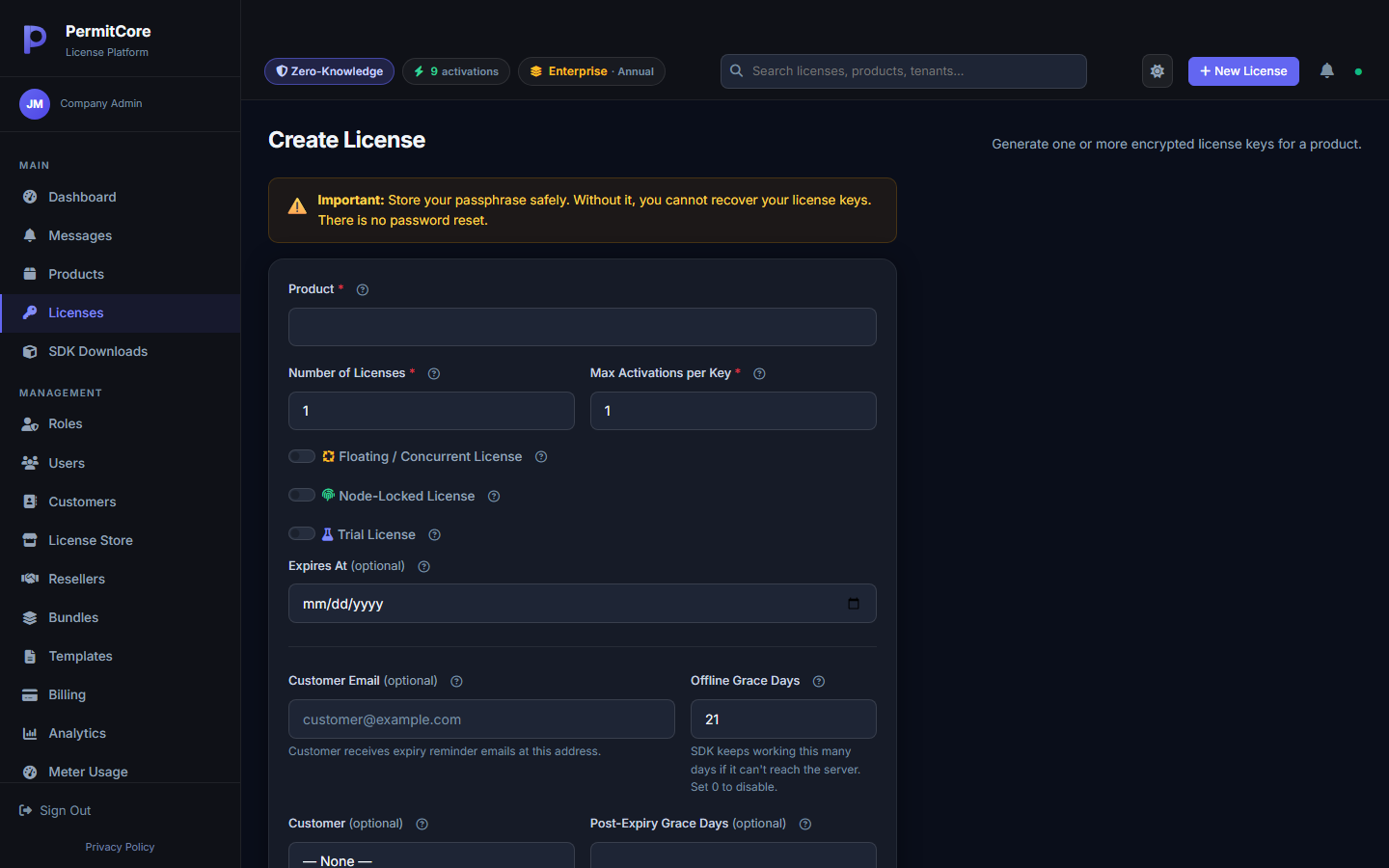
Both options sit right next to each other on the Create License form, and it's not always obvious which one fits your product. The short version: node-locked ties a key to specific machines; floating ties a key to a pool of concurrent seats that any machine can borrow from. Here's when each one actually makes sense.
Node-Locked: One Key, Specific Machines
A node-locked license binds to a device's hardware fingerprint when activated and stays bound until deactivated. MaxActivations limits how many devices may currently hold that key; deactivation frees a slot.
This is the right default for most desktop software: a customer buys one seat, installs it on their one work laptop, and that's that. It's simple to reason about, simple to support, and matches how most customers already think about "a license."
Floating: A Shared Pool of Seats
A floating license doesn't permanently assign every installation a seat. Your app checks out a device session when it starts and checks in after work stops. MaxConcurrentSessions limits concurrent device sessions; it is separate from the activation limit. The same license and device ID renew one existing session, so separate app processes on one device need a coordinated lifecycle.
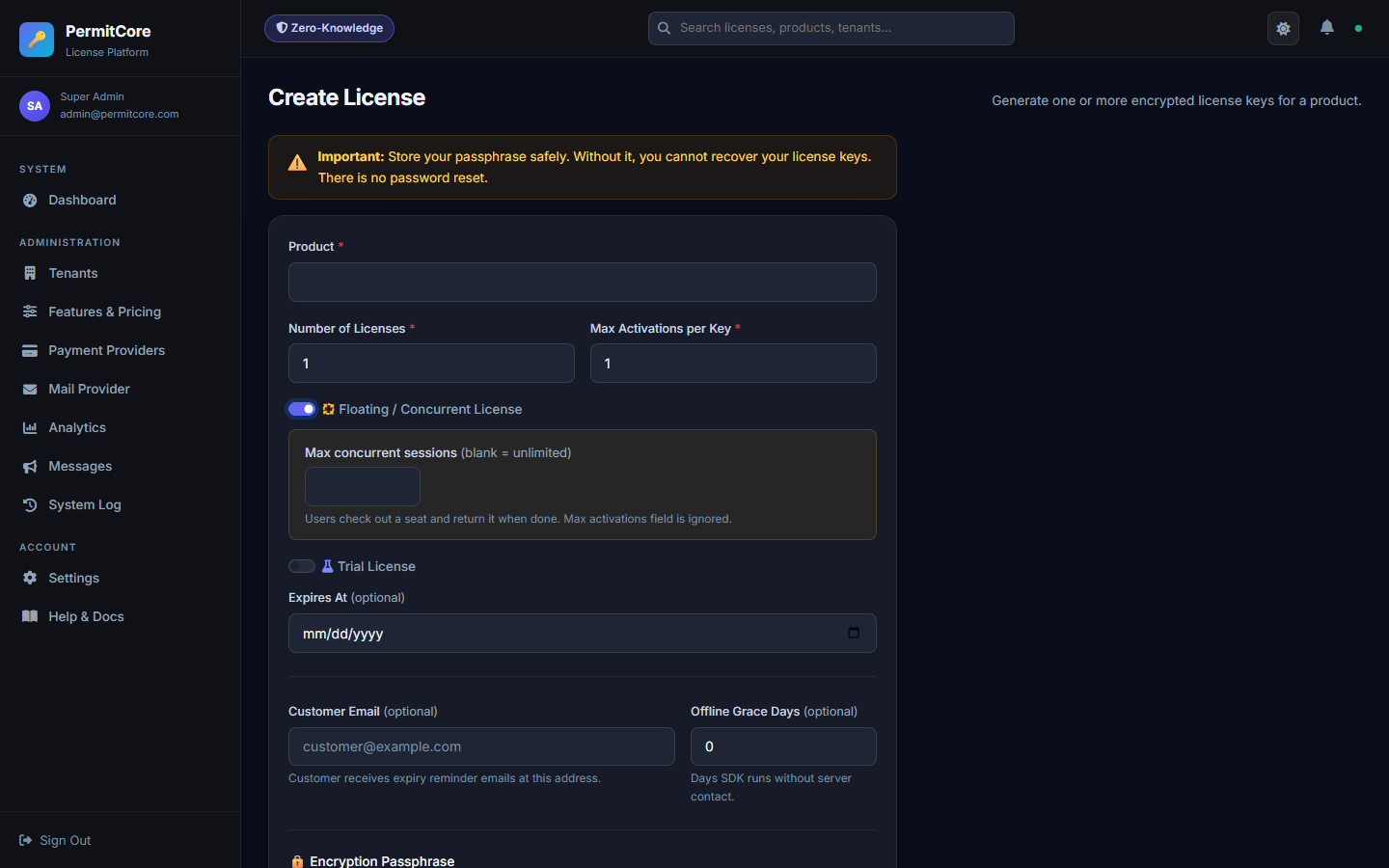
A 10-seat floating license can serve many installations with up to 10 active device sessions at once, subject to the plan's cap.
This is the right fit for office software used by a team that's never all logged in simultaneously — CAD tools, analytics dashboards, anything where you'd rather sell "10 concurrent users" than "10 named installs."
The .NET SDK uses CheckoutAsync, HeartbeatAsync and TryCheckinAsync, with SessionToken as the credential. The shared example below is compiled against the SDK and tested for cancellation and failure cleanup.
Show the .NET session lifecycle
This helper manages a floating lease. Before calling it, validate the key for your application using expectedProductId and provide the application version when using version rules; see license validation. Checkout itself does not carry those validation fields.
using System;
using System.Threading;
using System.Threading.Tasks;
using PermitCore;

namespace PermitCore.Examples;

public static class FloatingLeaseLifecycle
{
    public static async Task RunAsync(PermitCoreClient client, string licenseKey,
        Func<CancellationToken, Task> protectedWork, CancellationToken stop = default,
        TimeSpan? heartbeatInterval = null)
    {
        var interval = heartbeatInterval ?? TimeSpan.FromMinutes(4);
        if (interval <= TimeSpan.Zero || interval > TimeSpan.FromMinutes(4))
            throw new ArgumentOutOfRangeException(nameof(heartbeatInterval));

        var seat = await client.CheckoutAsync(licenseKey, ct: stop);
        if (!seat.Success || string.IsNullOrWhiteSpace(seat.SessionToken))
            throw new InvalidOperationException("No floating seat was granted.");

        var token = seat.SessionToken;
        using var lease = CancellationTokenSource.CreateLinkedTokenSource(stop);
        Task? work = null;
        try
        {
            var remaining = Remaining(seat);
            lease.CancelAfter(remaining);
            work = protectedWork(lease.Token);
            while (!work.IsCompleted)
            {
                var pause = Task.Delay(remaining / 2 < interval ? remaining / 2 : interval, lease.Token);
                if (await Task.WhenAny(work, pause) == work) break;
                await pause;
                var renewed = await client.HeartbeatAsync(token, lease.Token);
                remaining = Remaining(renewed);
                lease.Token.ThrowIfCancellationRequested();
                lease.CancelAfter(remaining);
            }
            await work;
        }
        finally
        {
            lease.Cancel();
            try
            {
                if (work is not null) await work;
            }
            catch (OperationCanceledException) when (lease.IsCancellationRequested) { }
            finally
            {
                using var cleanup = new CancellationTokenSource(TimeSpan.FromSeconds(5));
                if (!await client.TryCheckinAsync(token, cleanup.Token))
                    Console.Error.WriteLine("Seat return unconfirmed; the last granted deadline still applies.");
            }
        }
    }

    private static TimeSpan Remaining(FloatingSession session)
    {
        if (!session.Success || !session.ExpiresAt.HasValue)
            throw new InvalidOperationException("Floating access could not be renewed.");
        var remaining = session.ExpiresAt.Value.ToUniversalTime() - DateTime.UtcNow;
        if (remaining <= TimeSpan.Zero)
            throw new InvalidOperationException("The floating session deadline has passed.");
        return remaining;
    }
}Pass your application's work as protectedWork and use its cancellation token in every protected operation. Cancellation is cooperative: the helper cannot stop code that ignores that token. It waits for work to stop before returning the seat. A failed checkin is reported as unconfirmed.
Side by Side
What Happens If a Floating Session Never Checks In?
If a device crashes or loses power, its session stops authorizing use at the last granted expiresAt deadline. Grants last up to fifteen minutes, capped at the license access deadline including applicable post-expiry/Store payment grace. A heartbeat checks the current license and plan; the app must stop protected work if renewal fails or the deadline passes. Expired rows are removed during eligible checkout/session-list queries. Revocation is checked on server requests rather than pushed immediately to every app.
What's Next
Read the floating license guide for a seat-pool example and FAQ, then use the integration reference. To distribute licenses through checkout, see the License Store guide.
Build your first licensed product without building a license server.
Create a free PermitCore account, issue a test license, and validate it from your application.