How to Implement Feature-Based Licensing
How to gate individual features by license tier instead of just validating a key — the real FeaturesJson field, the API response shape, and the SDK's HasFeature() check.
"Is this license valid?" is often the wrong question. The more useful one is usually "what does this specific license unlock?" — a Pro customer and a Team customer might both hold a genuinely valid key, but your app needs to know which of them gets the export button, SSO, or the API integration. That's feature-based licensing, and it's a field on the license key itself, not a separate system.
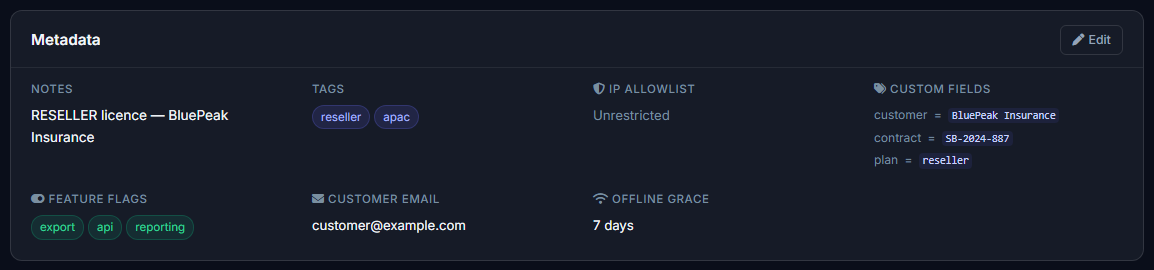
Each license key carries its own feature list — set once when the key is created or generated from a template.
Where features live
Every LicenseKey has a FeaturesJson field — a plain JSON array of feature-flag strings, e.g. ["export","api","sso"]. You set this when you create a key (or define it once on a License Template so every key generated from that template inherits the same list), and it's returned in full on every validate()/activate() call, no separate endpoint required.
Reading it in your app
The response's features field is a plain string array. PermitCore's .NET SDK adds one convenience method on top of it — the real code, unmodified:
/// Returns true if this feature flag is in the license's feature list.
public bool HasFeature(string feature) =>
    Features?.Contains(feature, StringComparer.OrdinalIgnoreCase) ?? false;
In your own code, that's a one-line gate:
var result = await client.ValidateAsync(licenseKey);

if (result.HasFeature("export"))
    exportButton.Visible = true;

if (result.HasFeature("sso"))
    EnableSsoLogin();
The check is case-insensitive on purpose — a typo'd casing difference between how a feature was set on the key and how you check it in code is exactly the kind of bug that only shows up for one customer, weeks later.
Two ways to assign features
Per-key. Set FeaturesJson directly when creating or editing an individual license — useful for a one-off custom deal or an enterprise customer with a negotiated feature set that doesn't match any of your standard tiers.
Via a License Template. Define a template once (e.g. "Pro Template" → ["export","api"], "Team Template" → ["export","api","sso","seats"]) and every key generated from it — whether created manually, through the Store, or via the Stripe checkout flow — inherits that feature list automatically. This is the right approach if you're selling more than one tier: define the tiers as templates once, and every future key just picks one.
Where this fits versus other licensing controls
Feature flags answer "what can this customer do," which is a different question from what node-locked vs. floating answers ("how many devices/seats can use it") or what an expiry date answers ("for how long"). Most real products combine all three — a Pro-tier key might be node-locked to 2 devices, expire in 12 months, and unlock a specific feature set, all on the same license.
Build your first licensed product without building a license server.
Create a free PermitCore account, issue a test license, and validate it from your application.